
Product Enhancements – Release Notes December 2025
December 16 Release Notes – PlanPlus Online – Version 5.68
Product Enhancements
- Task & Appointment History Log Improvements:
Added a scrollbar to the Task and Appointment History Log section, making it easier to review longer activity histories without clutter.
-
Task Category Change Tracking:
Category changes made within the Task Detail area are now recorded in the history log, improving visibility and traceability. -
Repeating Task Handling in Projects:
Improved handling of daily repeating tasks when dragged into a project, with proper confirmation to prevent accidental removal of the repeating pattern.
Bug Fixes
-
Task-to-Appointment History Tracking:
A history log entry is now created when a task is converted into an appointment, ensuring this action is properly recorded. -
Printed Task List Display:
Fixed an issue where the task detail area appeared empty when printing the task list from the homepage. -
Delegation & Repeating Icons Visibility:
Resolved issues where delegation and repeating icons were missing for delegated repeating tasks in both Daily and Weekly Planning summary views. -
Subtask Duplication Issue:
Fixed a bug where creating a subtask also created a duplicate unscheduled task on the Weekly Planning page. -
Priority Sync in Summary View:
Task priority now updates correctly in the Summary view for repeating and delegated tasks in Weekly Planning. -
Unscheduled Task Status Access:
Restored the status dropdown for unscheduled tasks in the Weekly Planning Summary view. - Weekly Planning Layout Refinement:
Improved spacing between the completion circle icon and milestone title on the Weekly Planning page for better readability.
December 04 Release Notes – PlanPlus Online – Version 5.67
Product Enhancements
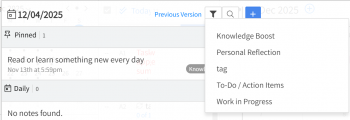
- Daily Notes Filter by Tag: Added a new dropdown filter in the Daily Notes section so you can quickly view notes by tag.
- Reporting History: All reports now include new columns for Created By, Creation Date & Time, Last Updated By, and Last Updated Time.
-
Opportunity Management:
-
Added a custom clone option for Opportunities.
-
The popup window for Opportunity Advanced Search has been enlarged for better viewing.
-
Bug Fixes
- Task-to-Appointment Conversion: Note data is no longer lost when converting a Task to an Appointment.
- Project Task Category Stability: Fixed an issue where project task categories would disappear automatically after being added.
-
Task Management & Planning:
-
Delegation Icons: Delegation icons now correctly show for repeating delegated tasks on both the Homepage and Weekly Planning summary views.
-
Delegation Window: Delegating a task from the Daily Planning summary view now opens the correct supported window.
-
Task Priority: Fixed bugs preventing new repeating tasks from being incorrectly assigned Priority A1 and ensuring “No Priority” tasks stay unassigned.
-
Task Visibility: Completed tasks are now correctly hidden from the Weekly Planning page.
- Daily Repeating Tasks: Daily repeating tasks no longer disappear after completion on the daily planning page.
-
Project Tasks: The Estimate Time field no longer disappears automatically after being added.
-
Drag & Drop: Role-Based Tasks can now be correctly Dragged and Dropped into the Calendar on the Weekly Planning Page.
-
Stability & Performance:
-
Fixed an issue on the Daily Planning page where resizing the screen triggered an infinite loop of calls.
-
Resolved login issues causing instant login delays and unexpected clearing of the password field.
-
-