
Product Enhancements – Release Notes June 2026
June 25 Release Notes – PlanPlus Online – Version 5.78
Product Enhancements
- Added advanced filtering options for Lists, Roles, Goals, Projects, Categories, Statuses, and Recurrence.
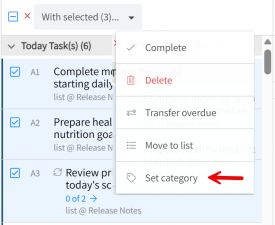
- Added “Set Category” support for multi-task selection from the homepage.
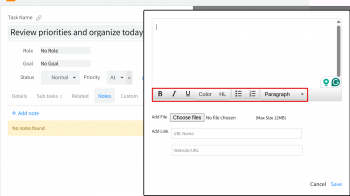
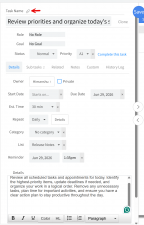
- Added Rich Text Editor support for both Task Notes and Appointment Notes.
- Added loaders during drag-and-drop operations to provide better visual feedback.
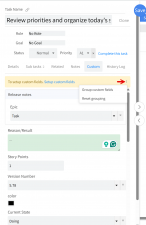
- Added support for grouping custom fields within the Task Detail area.
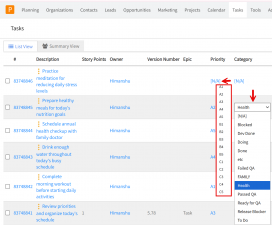
- Enabled editing of Category and Priority directly from the Task page without opening Task Details.
- Added direct access to Task Details through shareable links.
- Added onboarding notifications for new users on the homepage.
- Added the ability to pause subscriptions.
- Included the Billing page during social sign-up.
- Removed the “Create Goal” option from the Personal Balance section on the Weekly Planning page.
- Added text color formatting support in the Rich Text Editor.
- Restored Category and Estimated Time fields in the Task Detail area.
- Improved the Task Detail panel UI by resolving menu overlap and dropdown visibility issues.
Bug Fixes
- Fixed an issue where users were unable to type or save information correctly in the Task Detail area after expanding sections.
- Resolved multiple task list issues, including list renaming, filtering, horizontal scrolling, and task count updates.
- Fixed task creation and display issues, including tasks requiring a page refresh before appearing and delegated tasks not displaying correctly.
- Resolved drag-and-drop issues across Daily and Weekly Planning, including category retention, milestone behavior, subtask movement, and loader feedback.
- Fixed issues where task details or custom field data disappeared or failed to update after editing.
- Corrected notification, subscription, and homepage issues, including notification icon behavior, cancelled account errors, hidden Vision Board tasks, and task count updates after deletion.
- Fixed UI issues affecting menus, dropdowns, estimated time controls, and task detail panel interactions