
Product Enhancements – Release Notes March 2026
March 20 Release Notes – PlanPlus Online – Version 5.75
Product Enhancements
- Better Recurring Tasks
Added reminders for repeating tasks so you never miss a scheduled item - Clearer Task Details
You can now hover over long task names on the Homepage to see the full title instantly. - Easier List Scrolling
Introduced a scrollbar in the Category List on the Homepage for faster navigation. - Pick Multiple Filters
On the Task Page, you can now select more than one option at a time in the List Filter. - New Menu Options
Replaced the old “Edit” pencil with a modern three-dot menu on the Homepage, now including a quick “Delete” option for subtasks. 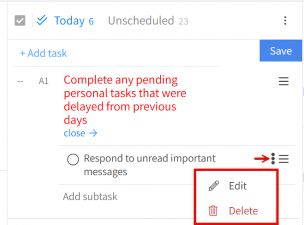
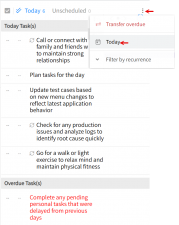
- Smart “Today/Overdue” View
You can now see “Today” and “Overdue” tasks combined in one view from the Homepage menu. -
- Better Reports
Task Report graphs now display values directly—no need to hover to see details. - Visual Fixes
Category colors are now displayed on the Task Page for better visibility and organization.
Bug Fixes
-
Cleaned Up the Dashboard:
Resolved sidebar alignment issues and improved text wrapping on the Homepage for a cleaner, more professional layout. -
Improved Typing & Saving:
Fixed a bug where special characters (like dashes) turned into question marks and ensured your task notes save correctly every time without losing data. -
Smarter Task Logic:
Resolved an issue where completing a single recurring task in search would unintentionally complete the entire series. -
Smoother Screen Experience:
Eliminated the flickering effect on the Vision Board page and ensured the latest history logs for appointments and tasks always appear at the top
March 04 Release Notes – PlanPlus Online – Version 5.74
Product Enhancements
-
“Today” Quick Navigation Button
-
Added a Today button on the Daily Planning page for faster access to the current date.
-
-
History Log Sorting Option
-
Added Latest First and Oldest First sorting options.
-
-
Task Category Color Visibility
-
Task category color now displays in the Homepage summary view.
-
-
Multi-Select Filter Support
-
Enabled multi-select option in task filters.
-
-
Improved Multi-Select Help & Labels
-
Added help tip and improved custom field label display on the Task page.
-
-
Sticky Date Header
-
Date header now remains fixed in the Weekly Planning Daily Task section.
-
-
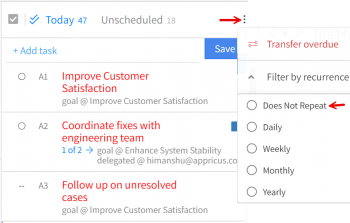
“Does Not Repeat” Filter Option
-
Added new option in the Recurring Task filter on Homepage.
-
-
New “Type/List” Grouping Option
-
Added Type/List option in the Group By dropdown for the “Tasks – By Period Type” report.
-
Bug Fixes
- Fixed Role & Goal Display Issues
Resolved disappearing role titles, corrected long role/milestone wrapping, fixed inconsistent sizing, restored dropdown scrollbar functionality, resolved emoji update issues, and corrected number alignment on the Homepage.
-
Corrected Task & History Log Issues
Fixed incorrect drag-and-drop history entries, ensured role/goal names retain when converting tasks to appointments, resolved overlapping text in task details, and corrected special character display issues (including quotes and “%” symbol). -
Improved Weekly Planning Layout & Icon Alignment
Resolved category border overlap, three-dot menu conflicts, corrected drag-and-drop icon positioning and color mismatch, and fixed spacing inconsistencies. -
Resolved Vision Board & Tooltip Issues
Fixed habits disappearing when using the “%” symbol and corrected bookmark tooltip text.